
Enshrouded Sparkworks Guide: Tool, Unlock and AND vs OR Logic
Unlock the Sparkworks Tool, compare lever and pressure-plate signals, and use a four-state test sheet to plan your first door circuit.
Research note: Checked November 8, 2026. AI-assisted source research, with an original two-input truth table and test worksheet checked for logical consistency. Scope: Enshrouded 1.0. This is not an independently playtested circuit or a screenshot of the graph editor.
Quick answer
Sparkworks links an input to an outcome in your base. A lever or pressure plate can drive an output such as a door. Keen Games introduced the system with 1.0 and describes a 2D graph editor for configuring connections and behavior. Official feature introduction, 1.0 changelog.
For a useful first project, decide whether the door should open when both controls are active or when either is active. That choice is the difference between an AND plan and an OR plan. Sketch the four possible input states before placing a complicated trap or puzzle.
Cover credit: © Keen Games. Official Enshrouded press kit. Official Thralls of Twilight Gem Forge promotional image; not the Citadel recipe room or a placed base forge.

Where the Tool and Workbench fit
The game-data reference connects the Carpenter's Contraptions And Mechanisms quest to a trapped Night Sanctum, the Sparkworks Tool, and completion after building the Sparkworks Workbench. It lists a Switchbox as an entry to the graph editor. Treat the quest objective shown in your installed build as the progression check. Sparkworks progression and parts.
Before searching for a missing recipe, separate three questions: do you have the progression unlock, do you have the tool for working on connections, and do you have the actual prop you want to connect? A door built for decoration and a working input-output plan are different things to check.
Lever versus pressure plate: choose the signal
The same data reference distinguishes a lever that keeps its state until reused, a pressure plate active while occupied, and a push button that sends a short pulse. These differences matter when an output appears to close immediately or fails to remain active. An AND node requires every incoming signal; an OR node requires at least one.
Our example uses a lever as input A and a pressure plate as input B. The desired output is simply an open-door signal. Here is the complete expected-state sheet:
- A off, B off: AND off; OR off.
- A on, B off: AND off; OR on.
- A off, B on: AND off; OR on.
- A on, B on: AND on; OR on.
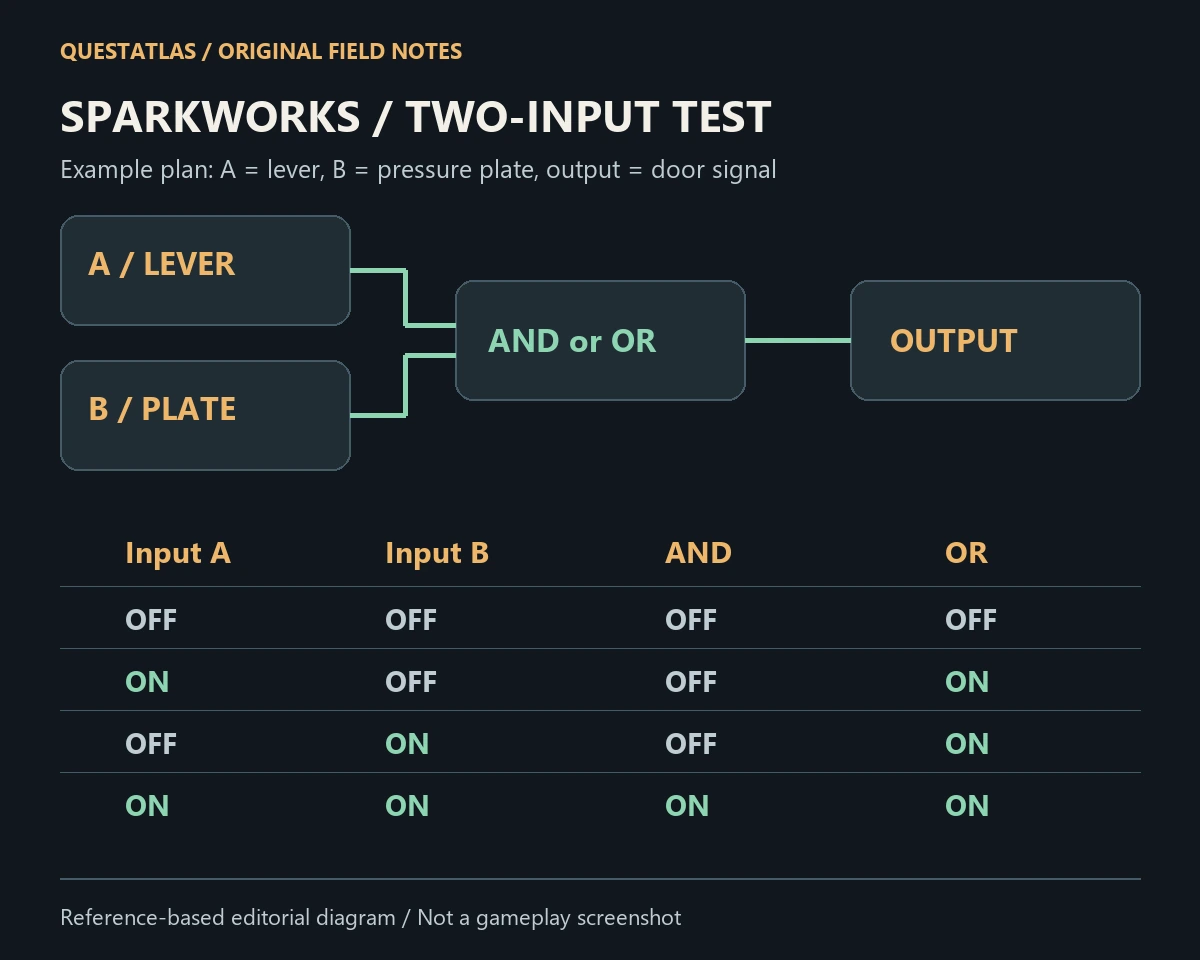
Independent analysis: This table follows Boolean logic and the reference descriptions of the two nodes. It does not establish a tested in-game port order, exact control binding or multiplayer behavior.
A first-circuit test worksheet
Start with a visible door or light rather than a damaging output. Write down the output you expect for each of the four states above. Then check one state at a time in your own save, keeping the input A/input B labels consistent with your sketch.
- Record the starting positions before changing a connection.
- Change only A and compare the outcome with the relevant row.
- Return to the starting positions, change only B and compare again.
- Activate both inputs, then release or reset one at a time.
- Record the actual outcome alongside the expected outcome, including any delay.
If the observed result differs, this record narrows the question to a specific transition. It is easier to investigate “the door stays open after B turns off” than “the whole circuit is broken.”
If your Sparkworks circuit does not behave as expected
Use these as diagnostic questions, not confirmed fixes for every game bug:
- Is the selected node AND when you intended OR?
- Did you choose a momentary button where you wanted a persistent lever?
- Are you looking at the same input and output objects as the sketch?
- Is another connection contributing a signal to the output?
- Does the behavior repeat after you return the circuit to its recorded starting state?
Keep your installed build number with the worksheet. If a minimal circuit still differs from the documented behavior, include that small example when reporting the issue. For a broader post-update check, use our Enshrouded 1.0 returning-player checklist.
Sources and version scope
The official announcement establishes the feature; the linked community game-data reference provides the progression and signal details. We have not independently completed the unlock quest or tested this circuit in-game. Recipe and interface changes in later patches can affect the steps you see.
- Keen Games: Sparkworks introduction, October 8, 2026
- Keen Games: complete 1.0 changelog, October 14, 2026
- Community data: Sparkworks progression, parts and logic nodes
For another late-game crafting project, see the Gem Forge unlock guide. Send a correction with the article URL, build and the smallest circuit that reproduces the difference.